
Introduction
Managing meetings and appointments may seem like a simple administrative task, but scheduling becomes increasingly complicated as businesses grow.
Employees may have multiple calendars. Teams need visibility into colleagues' availability. Customers need convenient ways to book meetings. Managers need to coordinate activities across departments, while businesses increasingly operate across multiple locations and time zones.
For many organisations, the challenge is no longer simply finding an available time. It is making sure that the right people, activities, locations and information are connected to that time.
Odoo's Calendar application is already integrated with other parts of the Odoo ecosystem, including Activities, CRM, Appointments and employee scheduling. With Odoo 20, the roadmap points towards a more powerful and flexible scheduling experience, particularly around multi-calendar management, personal booking pages, colleague availability, work locations, activity visibility and smarter event creation.
Odoo 20 has not yet been officially released. Odoo's own upcoming Odoo Experience 2026 programme confirms that a dedicated session will cover the new features in Calendar, Activities and Appointments, but the final release documentation is still to come.
So, what should businesses be watching for?
1. Multi-Calendar Management
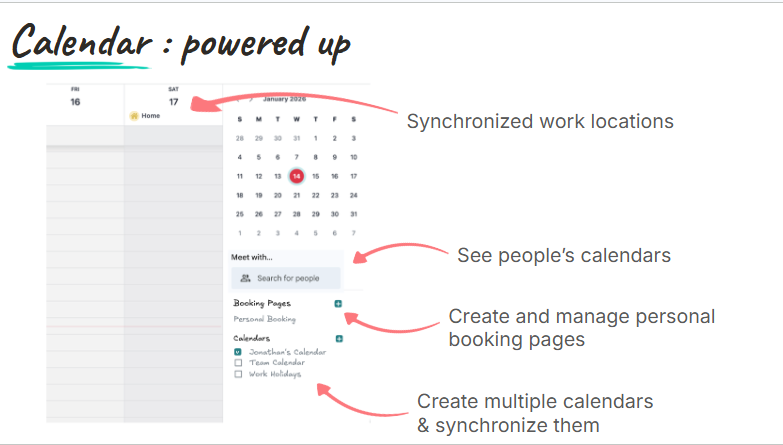
One of the most significant Calendar improvements expected in Odoo 20 is multi-calendar management.
Instead of treating a user's Odoo calendar as their only scheduling source, the roadmap points towards the ability to create and manage multiple calendars and synchronise them.
This is particularly useful for people who already work with several calendars for different purposes.
For example, a business owner could have:
- A personal calendar
- A company calendar
- A sales calendar
- A project calendar
- An external Google Calendar
- An Outlook calendar
Managing these separately can make availability difficult to understand.
Odoo 20 is expected to provide a more unified way of managing these calendars so users can see a clearer picture of their schedules.
Why this matters
The benefit goes beyond convenience.
If employees have incomplete calendar information, meetings can be scheduled when they are actually unavailable. A more comprehensive view of calendars can reduce scheduling conflicts and make availability management more reliable.
For executives, sales representatives, consultants and employees who regularly work with external organisations, this could be particularly valuable.
2. Synchronising Multiple Google and Outlook Calendars
Odoo already provides calendar synchronisation with external calendar services.
The Odoo 20 roadmap goes further by indicating support for synchronising multiple Google or Outlook calendars.
This is important for organisations where employees don't operate exclusively in a single calendar environment.
For example, an employee may use:
Odoo Calendar + Google Calendar + Outlook Calendar
Instead of manually checking each system before accepting an invitation, the goal is to bring these scheduling sources together.
This can make Odoo more useful as the central scheduling layer for businesses with mixed technology environments.
3. Personal Booking Pages
Another major addition is the ability to create personal booking pages.
A personal booking page allows someone to share their availability with another person, who can then select an appropriate time.
This removes much of the back-and-forth normally associated with scheduling.
Instead of:
"Are you available Tuesday?"
"No, what about Wednesday?"
"I'm busy Wednesday afternoon."
"How about Thursday?"
The process becomes:
Share booking page → Customer selects available slot → Meeting is scheduled.
The Odoo 20 roadmap specifically identifies personal booking pages as one of the Calendar improvements.
Who could use this?
This would be especially useful for:
- Sales representatives
- Consultants
- Business development teams
- Recruiters
- Account managers
- Executives
- Customer success teams
- Service providers
For example, a salesperson could include a booking link in their email signature so prospects can schedule a meeting without exchanging several emails.
4. Better Visibility Into Colleagues' Calendars
Odoo 20 is also expected to make it easier to see colleagues' calendars.
This is particularly useful when meetings involve several employees.
Instead of asking each person whether they are available, users can get a clearer view of team schedules and identify suitable time slots.
This can be particularly useful for:
- Management meetings
- Sales meetings
- Project reviews
- Interviews
- Client consultations
- Team planning sessions
The more people involved in a meeting, the more valuable shared availability becomes.
5. Synchronised Work Locations
Modern employees don't necessarily work from one fixed location.
Someone might work:
- From the office
- From home
- From a client's location
- From another company branch
- Remotely while travelling
Odoo 20 is expected to introduce synchronised work locations within the Calendar experience.
This provides additional context around availability.
Knowing that someone has an available time slot is useful.
Knowing where that person will be working is even more useful.
For example, scheduling an in-person meeting with an employee who is working remotely that day may not make sense.
Work-location information can therefore help businesses make better scheduling decisions.
6. Smarter Time Detection From Event Titles
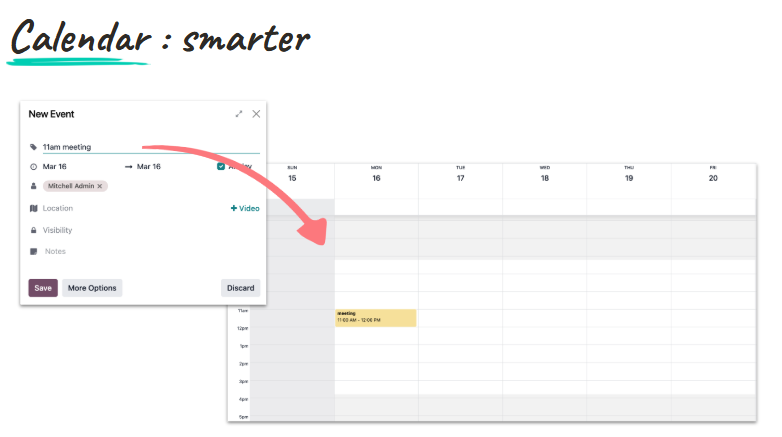
One of the more subtle—and potentially very useful—Calendar improvements is automatic time detection from event titles.
According to the roadmap, users could type something such as:
"11am meeting"
and Odoo can detect the time and automatically set the event accordingly.
This is a small usability improvement, but it illustrates an important direction for Odoo 20.
Instead of forcing users to interact with multiple fields to create a simple event, the system becomes better at understanding natural input.
Why this matters
The faster it is to create an appointment, the more likely employees are to keep their calendars updated.
That can lead to better scheduling data across the organisation.
7. Activities Appearing Directly in the Calendar
Another significant change is the integration of Activities into the Calendar view.
Odoo activities are tasks or follow-up actions that users need to complete.
These can include things such as:
- Calls
- Emails
- Meetings
- To-dos
- Follow-ups
The Odoo 20 roadmap indicates that activities from across Odoo will become visible directly within the Calendar, with pending activity counts displayed per day.
This brings two previously separate concepts closer together:
Scheduled events and things you need to do.
8. A More Complete View of the Workday
Consider the difference between these two calendars.
Traditional calendar
9:00 AM — Sales meeting
11:00 AM — Client meeting
2:00 PM — Team meeting
This tells you when meetings are taking place.
But it doesn't necessarily show all the other work you need to complete.
Odoo 20's expected approach
9:00 AM — Sales meeting
10:00 AM — Follow up with prospect
11:00 AM — Client meeting
1:00 PM — Send quotation
2:00 PM — Team meeting
The second view provides a better representation of the employee's actual workload.
This can help employees plan their day rather than simply viewing their calendar as a list of meetings.
9. Easier Linking of Calendar Events to Business Records
The Odoo 20 roadmap also highlights easy linking to records as part of the Calendar improvements.
This is important because meetings rarely exist in isolation.
A meeting might relate to:
- A CRM opportunity
- A customer
- A project
- A sales order
- A task
- An employee
- An appointment
Connecting the calendar event to the relevant business record gives employees additional context.
For example, a salesperson preparing for a client meeting can have the event connected to the relevant CRM opportunity rather than searching through different applications for background information.
This supports Odoo's wider goal of creating deeper connections between applications in version 20. Odoo's roadmap broadly emphasises deeper app integration, automation and improved user experience.
10. More Fluid Availability Management
Scheduling is not simply about knowing whether someone is free.
Businesses often have rules around when appointments can take place.
For example:
- Meetings should not start immediately after another meeting.
- There should be preparation time between appointments.
- Certain employees may only be available during particular hours.
- Customer appointments may require buffers.
- Resources may need time between bookings.
The Odoo 20 roadmap points towards fluid availability management with slot buffering.
This is particularly relevant to businesses that use Odoo Appointments alongside Calendar.
Instead of allowing appointments to fill every available minute, businesses can introduce appropriate spacing between bookings.
11. Calendar and Appointments Are Becoming More Connected
The Calendar improvements should not be considered separately from changes coming to Odoo Appointments.
Odoo's upcoming Odoo Experience 2026 session specifically groups Calendar, Activities and Appointments together when discussing the new functionality.
The roadmap indicates improvements to Appointments including:
- Visual creation of availability slots
- Slot buffering
- Refreshed appointment webpages
- Recurrence
- Closing days
- Capacity management
- Teams meeting links
- Integration with POS floorplans
This makes the scheduling ecosystem considerably broader.
12. Improved Appointment Capacity Management
Businesses don't always schedule meetings for individuals.
Sometimes appointments involve resources or capacity limits.
For example:
- A training session may have 20 available seats.
- A consultation room may only accommodate one appointment at a time.
- A service team may only handle a certain number of customers.
- A restaurant may have a limited number of tables.
Odoo 20's expected improvements to appointment capacity management could make these scenarios easier to manage.
Instead of simply asking whether a person is available, the system can take capacity into account.
13. Better Recurring Appointments
Recurring meetings are common in businesses.
Examples include:
- Weekly management meetings
- Monthly client reviews
- Recurring consultations
- Employee one-on-ones
- Training sessions
- Maintenance appointments
Odoo 20 is expected to improve recurrence functionality within Appointments.
This can reduce the administrative work involved in setting up repeated appointments.
14. Better Support for Closing Days
Businesses don't operate every day.
There may be:
- Public holidays
- Company holidays
- Weekends
- Maintenance days
- Seasonal closures
The Odoo 20 Appointments roadmap includes improvements around closing days.
This helps prevent customers from booking appointments during periods when the business isn't available.
For organisations offering customer-facing appointment scheduling, this is particularly important.
15. Microsoft Teams Integration
Another useful improvement expected within Appointments is support for Microsoft Teams meeting links.
For organisations already using Microsoft Teams for virtual meetings, this can make online appointment scheduling more seamless.
A customer books an appointment.
↓
The system creates the appointment.
↓
The meeting includes the Teams link.
↓
The participants receive the necessary information.
This reduces the need to manually create and distribute virtual meeting links.
16. Integration With POS Floorplans
One of the more specialised Appointment developments is integration with POS floorplans.
According to the Odoo 20 roadmap, customers can potentially book specific tables or areas from the website, such as:
- Bar
- Terrace
- Interior seating
This is particularly relevant to restaurants and hospitality businesses.
It demonstrates how Odoo is moving beyond generic calendar appointments toward industry-specific scheduling.
A customer isn't simply booking:
"7:00 PM"
They can potentially book:
"7:00 PM — Terrace table."
That appointment can then connect with the restaurant's operational workflow.
17. A More Consistent Scheduling Experience Across Odoo
One of the broader themes behind Odoo 20 is consistency.
Odoo's Partner Day roadmap describes the upcoming release as focusing on:
- Further automation
- Improved UX/UI
- Deeper integration between applications
- Smarter use of AI and data
- Flexibility and scalability
The Calendar changes fit neatly into this strategy.
Instead of having separate experiences for:
Calendar → Activities → Appointments → CRM → Projects
Odoo is increasingly connecting these workflows.
The result should be a scheduling system that understands more about the work surrounding an appointment.
What Could These Odoo 20 Calendar Updates Mean for Businesses?
Taken together, these changes could have a significant effect on how businesses manage time.
Imagine a sales representative's workflow.
A prospect wants to schedule a meeting.
The salesperson shares their personal booking page.
The prospect sees the salesperson's availability.
The booking takes into account existing calendar commitments.
The appointment is created.
The meeting is connected to the relevant CRM opportunity.
The salesperson's follow-up activity appears in the Calendar.
The salesperson can see where colleagues are working.
If the meeting is virtual, the appropriate meeting link is available.
This is much more than a digital calendar.
It becomes part of the company's operational workflow.
Who Will Benefit Most From Odoo 20 Calendar?
The upcoming improvements will be particularly useful for businesses where scheduling plays an important role in daily operations.
Sales teams
Personal booking pages and CRM-linked meetings can simplify prospect scheduling and follow-up.
Consulting businesses
Consultants can share availability while managing multiple calendars and client commitments.
Professional services
Appointments, activities and client records can be connected more closely.
HR teams
Recruiters can coordinate interviews while viewing availability across relevant team members.
Healthcare and service businesses
Appointment capacity, availability and booking workflows can help manage customer-facing schedules.
Restaurants and hospitality
POS floorplan integration can connect online reservations with operational seating information.
Hybrid and distributed teams
Work-location synchronisation provides additional context when planning meetings.
How Businesses Can Prepare for Odoo 20 Calendar
Businesses don't need to wait for Odoo 20 to start improving scheduling.
A good starting point is to review how your organisation currently handles appointments and calendars.
Ask:
Are employees managing several calendars?
If so, identify which calendars need to be synchronised.
Are meetings being scheduled manually?
Consider whether personal booking pages could reduce unnecessary back-and-forth.
Are activities separate from calendars?
Review whether follow-up tasks and scheduled meetings should be managed together.
Do customers book appointments online?
Examine your current appointment rules, capacity limits and availability.
Do employees work from different locations?
Consider how work-location information affects meeting planning.
Are meetings connected to business records?
Linking meetings to CRM opportunities, projects and other records can provide better context.
Final Thoughts
The Calendar improvements expected in Odoo 20 may not initially appear as dramatic as some of the platform's AI developments, but they address a fundamental business problem: how people manage time and coordinate work.
Multi-calendar management, personal booking pages, colleague availability, synchronised work locations, smarter time detection and Activities inside the Calendar can make everyday scheduling considerably more efficient.
Meanwhile, improvements to Appointments—including slot buffering, capacity management, recurrence, closing days, Microsoft Teams links and POS floorplan integration—extend Odoo's scheduling capabilities into customer-facing workflows.
The bigger story is integration.
Odoo 20 is expected to make Calendar less of a standalone scheduling tool and more of a connected layer between employees, customers, activities, CRM, appointments and other business processes.
That fits directly into Odoo's broader version 20 strategy of deeper application integration, improved user experience, increased automation and smarter use of data.
However, businesses should keep one important point in mind: Odoo 20 has not yet been officially released. Odoo has scheduled a dedicated Calendar, Activities and Appointments session for Odoo Experience 2026 on September 25, where the new features will be covered in more detail.
For organisations already using Odoo, this is a good time to review their current scheduling processes and identify where better calendar integration could improve productivity.
Stick around to get more information on how things shape up with Odoo 20