
Introduction
Scheduling meetings, consultations, services, and customer appointments can become surprisingly difficult as a business grows.
A customer may want to book a consultation. A prospect may need a sales demonstration. A restaurant may need to manage table reservations. A service provider may need to coordinate employees, resources, and customer availability.
Without an integrated scheduling system, these processes can quickly turn into a series of emails, phone calls, spreadsheets, and manual calendar updates.
Odoo Appointments is designed to solve this problem by allowing customers and prospects to book meetings, consultations, and services through online booking pages while connecting appointments with calendars, users, resources, CRM, and other Odoo applications.
Odoo 20 is expected to take this functionality further.
Roadmap information presented through Odoo Partner Days and published by Odoo partners points to several improvements, including visual slot creation, slot buffering, refreshed appointment webpages, better availability management, Microsoft Teams links, recurrence, closing days, capacity management, rescheduling, performance improvements, and deeper integration with Odoo POS floorplans.
Odoo itself has also scheduled dedicated sessions on the new Appointments functionality at Odoo Experience 2026, describing the upcoming improvements as making scheduling "smarter and more flexible."
Because Odoo 20 has not yet been officially released, the features discussed below should be understood as expected or roadmap-based updates, rather than a final list of release features.
What Is Odoo Appointments?
Before looking at what is coming in Odoo 20, it is useful to understand what the Appointments application already does.
Odoo Appointments is a self-service scheduling tool.
Instead of requiring a customer to contact a business to ask when someone is available, the business can publish an appointment page showing available dates and times.
The customer selects an available slot and provides the required information.
Depending on how the appointment is configured, Odoo can schedule the meeting with:
- An individual employee
- A team
- A meeting room
- Equipment
- A service resource
- A restaurant table or other resource
Odoo can also connect appointments with CRM opportunities, calendars, employee schedules, and other business processes.
This means Appointments is not simply a booking calendar.
It is a way of connecting customer scheduling with business operations.
What's New in Odoo 20 Appointments?
The Odoo 20 roadmap points towards a significant usability and flexibility upgrade for Appointments.
The major areas to watch include:
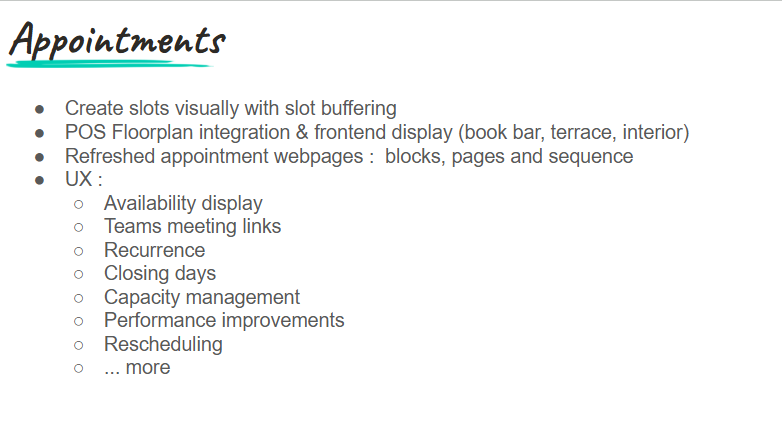
- Visual creation of appointment slots
- Slot buffering
- More fluid availability management
- POS Floorplan integration
- Refreshed appointment webpages
- Better availability display
- Microsoft Teams meeting links
- Improved recurrence
- Closing days
- Capacity management
- Rescheduling improvements
- Performance improvements
Let's examine what each could mean for businesses.
1. Create Appointment Slots Visually
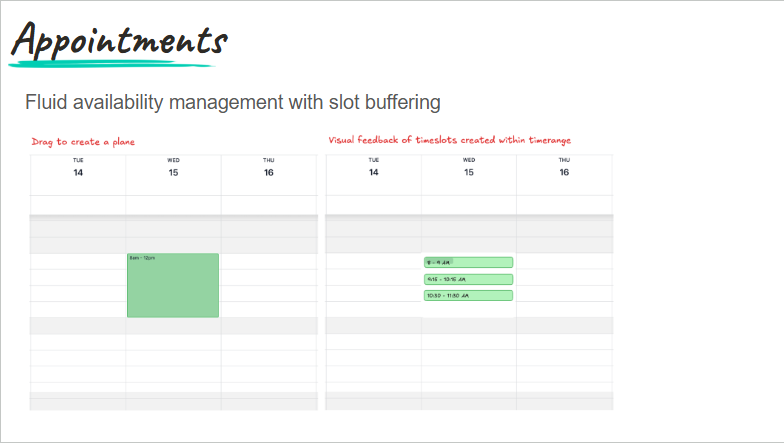
One of the most noticeable changes expected in Odoo 20 is a more visual approach to creating appointment availability.
Roadmap information indicates that users will be able to create availability slots visually by dragging directly on the calendar.
This changes how administrators interact with appointment schedules.
Instead of manually entering individual time ranges, a user could work directly in the calendar and select the periods during which appointments should be available.
For example, a consultant could select:
Monday: 9:00 AM – 12:00 PM
Tuesday: 1:00 PM – 4:00 PM
Thursday: 10:00 AM – 3:00 PM
and use those selections to establish appointment availability.
Why this is useful
Visual scheduling can make configuration easier to understand, particularly for businesses where availability changes frequently.
It can also make it easier for administrators to identify gaps and adjust schedules without working through multiple configuration fields.
2. Slot Buffering Between Appointments
One of the most practical expected improvements is slot buffering.
Imagine a consultant has three 30-minute customer appointments:
10:00–10:30
10:30–11:00
11:00–11:30
On paper, this looks efficient.
In reality, the consultant may need time between appointments to:
- Review notes
- Prepare documents
- Travel
- Reset a meeting room
- Complete administrative work
- Take a short break
Odoo 20's expected slot-buffering functionality is designed to provide more control over the space between appointments.
This can help prevent appointment schedules from becoming unrealistically packed.
Example
A business could configure a 15-minute buffer.
Instead of:
10:00 – 10:30 appointment
10:30 – 11:00 appointment
the system could make the next appointment available from:
10:45 AM
This creates a more realistic schedule.
3. More Fluid Availability Management
Slot buffering forms part of a broader improvement to availability management.
Odoo's roadmap describes Appointments as moving towards more fluid availability management.
This is important because availability is rarely static.
A business may have:
- Different working hours on different days
- Seasonal schedules
- Employee-specific availability
- Resource-specific availability
- Break periods
- Appointment buffers
- Temporary closures
The more flexible the scheduling system becomes, the easier it is for businesses to represent their actual operating conditions.
4. POS Floorplan Integration
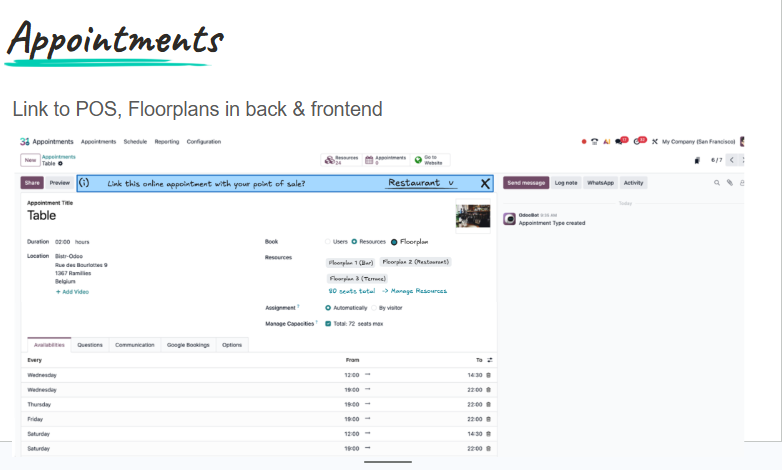
One of the most interesting Odoo 20 Appointments developments is the integration between Appointments and POS Floorplans.
The roadmap indicates that customers will be able to book specific areas or tables through the website, including options such as:
- Bar
- Terrace
- Interior
The booking can then connect with the restaurant's POS floorplan.
This is particularly significant for restaurants and hospitality businesses.
Consider a customer who wants to make a reservation.
Instead of simply selecting:
Friday, 7:00 PM
they could potentially select a particular type of seating or area.
For example:
Friday, 7:00 PM — Terrace
The booking is then connected to the restaurant's operational floorplan.
This brings together online customer booking and in-house restaurant operations.
5. Refreshed Appointment Webpages
Odoo 20 is also expected to introduce refreshed appointment webpages.
Partner roadmap material specifically mentions improvements to:
- Blocks
- Pages
- Page sequence
within the appointment webpage experience.
This is important because the appointment page is often the customer's first interaction with the booking process.
A well-structured appointment page should make it easy for customers to understand:
- What they are booking
- Who they are booking with
- How long it will take
- Where it will happen
- When it is available
- What information they need to provide
Improvements to the webpage structure can therefore make the booking experience easier to navigate.
6. Improved Availability Display
Availability is at the heart of the Appointments application.
If customers cannot easily understand which times are available, the booking process becomes frustrating.
The Odoo 20 roadmap specifically identifies availability display as an area of UX improvement.
This should make it easier for customers to understand available appointment slots when using the booking interface.
The objective is simple:
Show customers the times they can actually book, without unnecessary complexity.
7. Microsoft Teams Meeting Links
Virtual meetings have become a standard part of business operations.
Odoo's current Appointments functionality already supports video conferencing options, while the Odoo 20 roadmap specifically identifies Teams meeting links as an upcoming improvement.
This can make the process of scheduling online meetings more seamless.
For example:
- A prospect visits the appointment page.
- They choose a suitable time.
- Odoo creates the appointment.
- The appropriate Microsoft Teams meeting link is generated or associated with the booking.
- The participants receive the relevant meeting information.
This reduces the need to manually create a Teams meeting after every booking.
8. Improved Recurring Appointments
Many businesses have appointments that happen repeatedly.
Examples include:
- Weekly coaching sessions
- Monthly consultations
- Recurring client meetings
- Employee check-ins
- Regular training
- Maintenance appointments
- Subscription-related services
Odoo 20 is expected to improve recurrence within Appointments.
This could make it easier to represent recurring services and customer commitments without repeatedly creating individual bookings.
For a business that handles large numbers of recurring appointments, even small improvements here can reduce administrative work.
9. Closing Days
Businesses are not necessarily available every day.
There may be periods when appointments should not be bookable because of:
- Public holidays
- Company holidays
- Annual shutdowns
- Maintenance
- Staff training
- Special events
- Seasonal closures
The Odoo 20 roadmap identifies closing days as another Appointments improvement.
This is important because availability should reflect the actual operating calendar of the business.
A customer should not be able to book an appointment simply because a time slot technically exists when the business is closed.
10. Better Capacity Management
Appointments are not always limited by one person's availability.
Sometimes the limiting factor is capacity.
Consider a training company offering a class.
The trainer may be available from 9:00 AM to 12:00 PM, but the training room can only accommodate 15 participants.
The appointment system therefore needs to understand capacity.
Odoo already supports resources and capacity within Appointments. Its current documentation describes appointments that can be based on users or resources, including rooms, equipment, and seating areas.
Odoo 20 is expected to introduce further improvements to capacity management.
This could make Appointments more useful for businesses where multiple customers can participate in the same appointment or where physical resources impose limits.
11. Rescheduling Improvements
Customers inevitably change their plans.
A client may need to move a meeting from Tuesday to Thursday.
A prospect may need to change a product demonstration.
A customer may book the wrong time.
The Odoo 20 roadmap identifies rescheduling as an area of improvement.
A smoother rescheduling process can reduce administrative work for both customers and employees.
Instead of cancelling an appointment and starting the booking process again, customers can potentially move an existing booking to another available slot more easily.
This is especially important for businesses handling a large number of customer appointments.
12. Performance Improvements
As businesses increase the number of appointment types, employees, resources, and bookings they manage, performance becomes increasingly important.
The Odoo 20 Appointments roadmap includes performance improvements.
This is not necessarily a feature that customers will notice immediately.
But a faster scheduling interface can make a significant difference to businesses that depend heavily on appointments.
Performance matters when:
- There are many available slots.
- Multiple resources are involved.
- Customers are booking simultaneously.
- Teams manage large appointment volumes.
- Appointment pages are accessed frequently.
The smoother the experience, the less friction customers encounter when trying to book.
Odoo 20 Appointments and CRM
One of the most valuable aspects of Odoo Appointments is its connection with CRM.
The current Odoo functionality allows businesses to create CRM opportunities from appointments. Information collected during the booking process can be transferred into the opportunity, including contact information and answers to booking questions.
This is particularly useful for sales teams.
Consider a company that offers product demonstrations.
A prospect visits the website and books a demo.
During the booking process, they answer:
- What product are you interested in?
- How many employees are in your company?
- What problem are you trying to solve?
- When are you looking to implement a solution?
The appointment can then create or contribute information to the CRM opportunity.
The salesperson enters the meeting with more context.
This is an important part of the value proposition of Odoo Appointments:
The appointment doesn't have to exist separately from the sales process.
Odoo 20 Appointments and Customer Experience
The customer experience is another area where these improvements can have an impact.
Think about the current booking experience for many businesses:
Customer sends an email
↓
Business responds
↓
Customer suggests a time
↓
Business checks employee availability
↓
Business proposes another time
↓
Customer confirms
↓
Business sends meeting details
This process can take hours—or even days.
With online appointment scheduling:
Customer opens booking page
↓
Customer sees available slots
↓
Customer selects a time
↓
Customer provides required information
↓
Appointment is confirmed
The Odoo 20 improvements aim to make this self-service experience even more flexible.
Odoo itself describes appointment scheduling as a way to save time, reduce no-shows, and give clients a smoother way to book without the back-and-forth of emails or phone calls.
Odoo 20 Appointments for Nigerian Businesses
The upcoming changes could be particularly useful for businesses in Nigeria that rely heavily on customer appointments and messaging.
Potential use cases include:
Professional services
Law firms, consultants, accountants and other professionals can allow clients to schedule consultations based on actual availability.
Sales and demonstrations
Businesses selling software, machinery, professional services or other products can allow prospects to schedule demonstrations without contacting a salesperson manually.
Healthcare
Healthcare providers can use appointment scheduling to manage consultations and available resources.
Training organisations
Training providers can use capacity management for sessions with limited spaces.
Restaurants
POS Floorplan integration could make the Appointments module particularly relevant for restaurants managing online reservations and seating.
Customer service
Businesses can create structured appointment types for consultations, support sessions, and onboarding.
What Businesses Should Start Preparing for Odoo 20
Businesses don't have to wait for Odoo 20 to review their appointment processes.
In fact, this is a good opportunity to examine how appointments are currently handled.
Ask the following questions:
How are customers currently booking appointments?
If customers still rely heavily on phone calls, WhatsApp messages, or emails, there may be opportunities to introduce self-service scheduling.
Are appointment slots realistic?
If employees regularly move from one meeting directly into another, consider whether buffer periods are needed.
Are appointments connected to CRM?
For sales-related meetings, capturing customer information and connecting appointments to opportunities can improve preparation and follow-up.
Are resources part of your scheduling process?
If rooms, equipment, tables, or other resources affect availability, consider whether your current system properly accounts for them.
Do customers frequently reschedule?
If rescheduling creates administrative work, look for ways to make the process self-service.
Do you have recurring appointments?
Identify services that could benefit from recurring scheduling.
What Makes the Odoo 20 Appointments Updates Important?
Taken individually, some of these changes may appear relatively small.
Slot buffering is not a revolutionary concept.
Neither is adding a closing-day setting or improving recurrence.
But together, these improvements address a common weakness in appointment systems: they need to reflect how businesses actually operate.
Businesses have breaks.
Employees have different schedules.
Resources have capacity limits.
Customers cancel and reschedule.
Restaurants have different seating areas.
Meetings can be virtual.
Services can happen repeatedly.
Availability changes.
A scheduling system becomes much more valuable when it can represent these realities.
This is where the Odoo 20 Appointments updates become interesting.
The Bigger Picture: Appointments as Part of the Odoo Ecosystem
The most important thing to understand about Odoo Appointments is that it does not exist in isolation.
Odoo is an integrated business platform.
Appointments can interact with:
- Calendar
- CRM
- Website
- Employees
- Sales
- POS
- Discuss
- Online payments
- Other business applications
The current Odoo documentation already demonstrates this integration, including connections with CRM, Calendar, employee schedules, and resources.
The Odoo 20 roadmap appears to push this integration further.
A restaurant reservation can connect to a POS floorplan.
A sales appointment can connect to a CRM opportunity.
A virtual appointment can include a Teams meeting link.
A customer's booking can take employee availability and capacity into account.
This creates a much more connected workflow.
Final Thoughts
Odoo 20 is expected to make the Appointments module more flexible, visual and connected to the way businesses actually schedule people and resources.
The most notable developments to watch include visual appointment-slot creation, slot buffering, improved availability management, refreshed booking pages, recurrence, closing days, capacity management and rescheduling.
The integration with POS Floorplans could be especially interesting for restaurants and hospitality businesses, while Microsoft Teams links could simplify virtual appointments.
But the biggest change may be the overall user experience.
The goal is not simply to give customers a calendar where they can select a time.
It is to create a scheduling workflow that understands who is available, what resources are available, how much capacity exists, when the business is open, how much time is needed between appointments, and what business process the appointment belongs to.
Odoo's own 2026 event programme confirms that the company is actively showcasing new Appointments functionality, describing the improvements as making scheduling smarter and more flexible.
Businesses should therefore watch the final Odoo 20 release documentation closely.
And importantly, because Odoo 20 is not yet officially released, organisations should distinguish between confirmed roadmap items and final production functionality before making upgrade or implementation decisions.
For businesses already using Odoo, however, now is a good time to review how appointments are currently managed and identify where better automation, capacity management, online booking and integration could improve the customer experience.
Stick around to get more information on how things shape up with Odoo 20